
Scheduling the Memorial with New World Scheduler is quick and easy.
To schedule the Memorial:
- Add the Memorial as a Congregation Event
- Click Schedule > Memorial
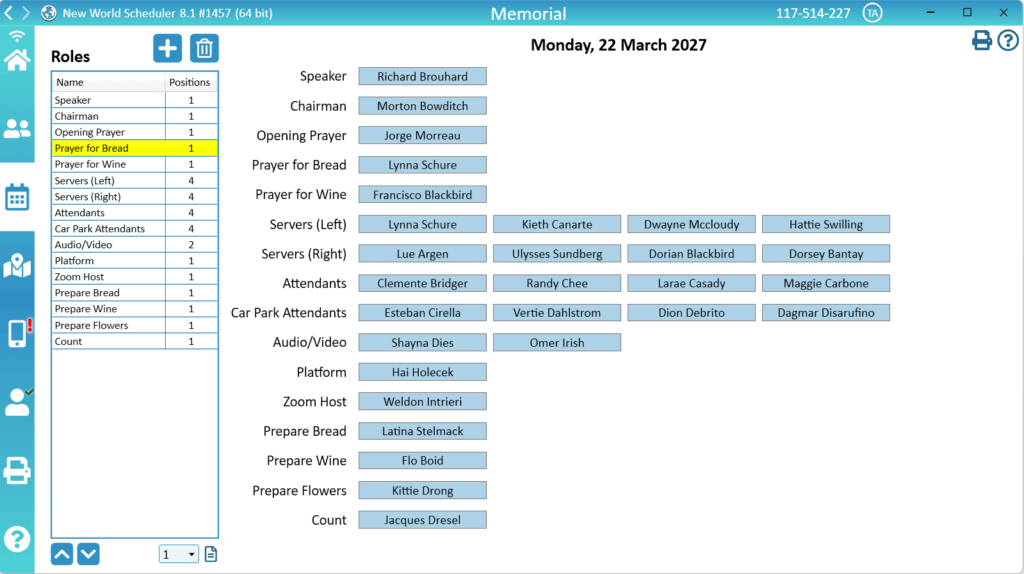
Schedule the Memorial
Congregation Event
- Click Congregation > Congregation Events
- Create new Event for the upcoming Memorial
- Note: You can only have one Memorial Event at a time
- See Congregation Events Help for more informatoin
Memorial Roles
- Click Schedule > Memorial
- Add, Edit or Remove the default Memorial Roles to suit your local circumstances.
- Note: These Roles are automatically saved for future memorials
- To edit the role name, double-click the Role name
- To adjust how many Positions are role has, use the dropdown box down the bottom
- To adjust the Roles order, use the up and down arrows
- Optionally, add a Description to a Role by clicking the Description button
Schedule
On the right-hand side, simply click to schedule publishers for each role.
You can optionally set the Filters to help you find the publishers you need.
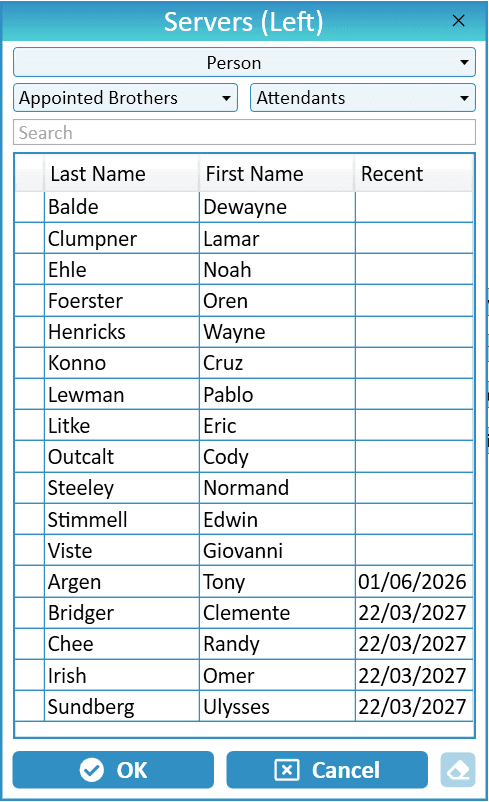
Display the Memorial Schedule
The memorial Schedule will be displayed on NW Publisher app under the Memorial Congregation Event.
All assigned Roles will appears on NW Publisher app under Duties for the assigned publishers.
You can also optionally print the Memorial Schedule.
Additional Help
- Schedule the Christian Life and Ministry Meeting
- Schedule Local Public Talks
- Schedule Away Public Talks
- Schedule Field Service
- Schedule Public Witnessing Carts
- Schedule Congregation Duties
- Schedule Kingdom Hall Cleaning
- Schedule Lawn & Garden Care
- Schedule Maintenance Tasks (LDC)
- Schedule Circuit Overseer Visit
- Schedule Memorial
- Custom Schedules
- Auto-Assign
- Language Groups