
New World Scheduler (NWS) is software system designed for Jehovah’s Witnesses to help with scheduling and organizing your congregation.
NWS consists of three separate packages that all work together:
NWS Mobile is a mobile version of New World Scheduler and contains many features found in NWS Desktop. It can run on Apple iOS, macOS and Google Android devices, and has been optimized for both mobile, tablet and laptop devices in both vertical and horizontal layouts.
NWS Mobile is a complete re-write of NWS Desktop using a new Development Framework and programming language. It has taken nearly 2 years of development and over 300,000 lines of code. It maintains the same structure, data and security features, and is designed to be used along with NWS Desktop.
NWS Mobile requires your congregation use the new Sharing Servers and have a Congregation Gold license. There is no additional cost.
NWS Mobile is currently BETA TESTING. This means problems or bugs are more likely, including data loss. Please only enable NWS Mobile if your congregation elders are willing to participate in BETA testing, are willing and able to report problems, and know how to restore data from backup in case of data loss.
Enable NWS Mobile
At this time, NWS Mobile must be enabled from within NWS Desktop by a Congregation Administrator.
- Note: NWS Mobile requires your congregation use the new Sharing Servers and have a Congregation Gold license.
- Open NWS Desktop
- Click Congregation Sharing > Overview
- Tick Enable NWS Mobile
- Optionally, tick Enforce NWS Mobile PIN Lock
Install NWS Mobile
NWS Mobile can be installed on the following devices:
- Apple iPhone or iPAD running iOS 15.0 or greater
- Apple computer running macOS 10.15 (Catalina)
- Android phone or tablet running Android 8.0 or greater



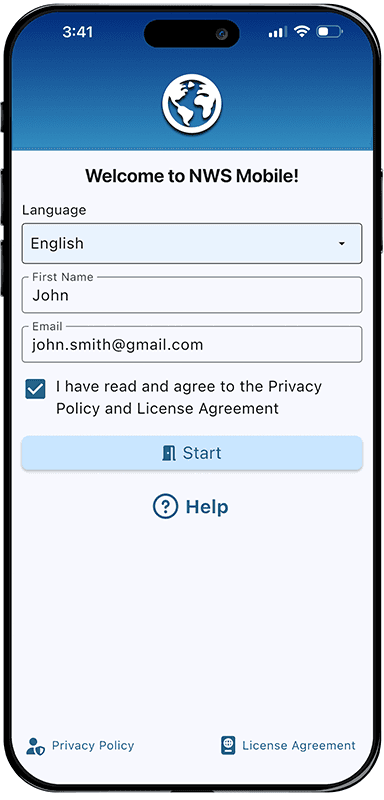
Getting Started with NWS Mobile
- Open NWS Mobile
- Select your preferred Language
- Enter your First Name
- Enter your Email
- Note: As in NWS Desktop, this email must exactly match your Shared Person email
- Read and agree to the Privacy Policy and License Agreement
- Tap Start
At this time, NWS Mobile only supports opening a congregation from sharing.
- Please see Open Congregation from Sharing
NWS Mobile Features
NWS Mobile currently supports the following features:
Congregation
- Congregation Overview
- Congregation Information
- Congregaton Sharing
- Overview (view only)
- Shared Persons (view only)
- Logs
- Problems
- Congregation Events
- Congregation Field Service Reports
- Congregation (view only)
- JW.org (S-1) (view only)
- Publishers (view only)
- Circuits, Congregations and Public Speakers
Persons
- Person Information
- Person Away Periods
- Person Spiritual
- Person Assign
- Publisher Reports
- Emergency Contacts
Schedule
- Life and Ministry Meeting
- Local Needs
- Public Talks Local
- Weekend Assignments
- Away Public Talks
- Duties
Territories
- Territories List
- Territory Information
- Territory Addresses
- Territory Assignments
- Territory Campaigns
NW Publisher app
- NWP App Summary (view only)
- Send NWP App Data
- Receive NWP App Data
- NWP App Persons
- NWP App Logs
Me
- My Tasks
- All Tasks (Congregation)
- Registration (view only)
Settings
- User Interface
- Meetings
Backup and Restore
- Backup
- Automatic Backups
- Restore
Other
- About
- Help
- Disconnect
More features may be gradually added over time.
NWS Mobile Data and Security
NWS Mobile has been designed in the same way as NWS Desktop, including the same data storage, E2E encryption and security techniques.
Please see Data Security and Privacy for more information.
Additionally, NWS Mobile allows brothers to personally enable PIN Lock, and allows Congregation Administrators to enforce NWS Mobile PIN Lock for everyone.